
Businesses now demand more control over how they run AI models. CTOs, engineering managers, and AI/ML engineers want secure local LLM deployment instead of relying only on cloud APIs. Startups building AI SaaS products and enterprises exploring private AI infrastructure also look for better cost control and stronger data privacy. As a result, the debate around LM Studio vs Ollama has become more relevant than ever in 2026.
Developers experimenting with open-source LLMs often ask, “Which is better, LM Studio or Ollama?” Product owners building AI-powered products and DevOps teams handling private AI infrastructure need tools that support performance, scalability, and production readiness. Many teams compare LM Studio vs Ollama for enterprise use, while others focus on Ollama vs LM Studio performance before moving to production. Choosing the best local LLM tool now impacts long-term architecture decisions.
In this blog, we break down the LM Studio vs Ollama comparison in simple terms. We explain how to deploy LLM locally in 2026 and what to consider for secure local LLM deployment. By the end, you will clearly understand which tool fits your technical needs, business goals, and production environment.
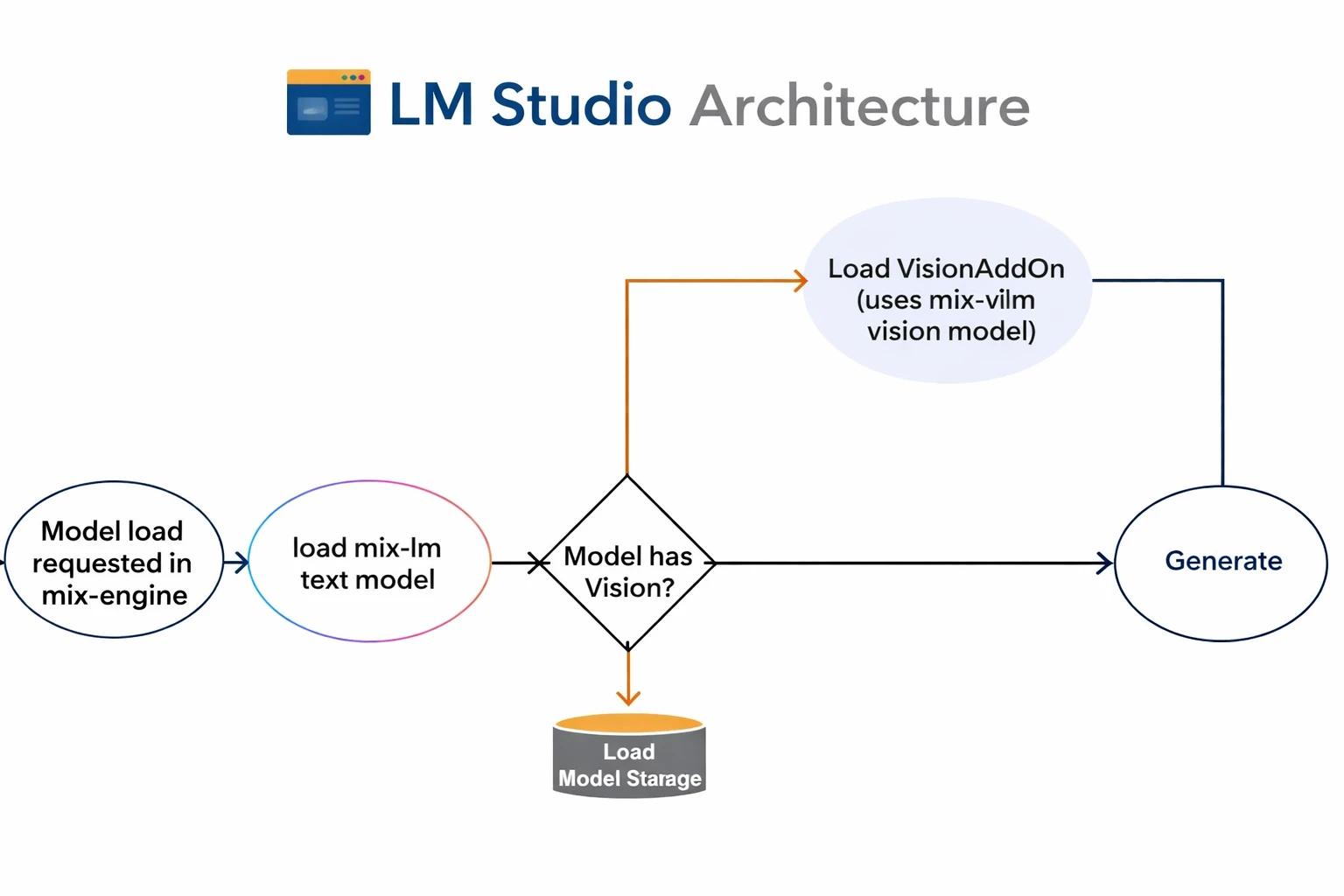
LM Studio is a desktop application that allows you to run large language models (LLMs) locally on your computer. It gives developers and businesses a simple way to experiment with AI without relying on external APIs.
If you are comparing LM Studio vs Ollama, you should understand that LM Studio focuses heavily on usability and visual control. It helps teams that want to explore local AI without deep DevOps complexity.
Many startups building AI SaaS products use LM Studio during early experimentation. Developers who want to test open-source LLMs locally also prefer it for quick setup. Companies concerned about data privacy in AI can use it to avoid sending data to third-party cloud providers.
For CTOs and technical decision makers, LM Studio works well in early-stage validation before committing to enterprise-grade infrastructure.
LM Studio provides a clean graphical interface. You do not need to rely on command-line tools. You can load, configure, and run models using visual controls. This approach makes it attractive for teams comparing the best local LLM tool for quick adoption.
LM Studio allows you to download and manage different open-source models from one place. You can switch between models easily. This flexibility helps AI/ML engineers test multiple LLMs during evaluation.
LM Studio allows fast local inference on supported hardware. You can run models directly on your machine without complex server configuration. Many developers researching how to deploy LLM locally in 2026 start with tools like LM Studio.
LM Studio simplifies installation. You can install it and run your first model in minutes. This simplicity helps product owners and engineering managers explore AI use cases without heavy infrastructure planning.
Pros
Cons
When teams evaluate LM Studio vs Ollama for enterprise use, they often find that LM Studio fits experimentation better than production environments.
Startups building AI SaaS products use LM Studio to test ideas quickly. Product teams validate features without building complex infrastructure. Teams comparing LM Studio vs Ollama often start with LM Studio for early experimentation.
AI/ML engineers use LM Studio to test multiple open-source LLMs on local machines. They compare outputs, evaluate accuracy, and optimize prompts. This process helps during a detailed LM Studio vs Ollama comparison before production decisions.
CTOs and engineering managers use LM Studio to build proof-of-concept AI solutions. They test feasibility before investing in full-scale infrastructure. Companies exploring LM Studio vs Ollama for enterprise use often begin with small controlled experiments.
Companies concerned about data privacy in AI run models locally using LM Studio. They avoid sending confidential data to cloud APIs. This setup supports secure local LLM deployment during early validation stages.
Developers experimenting with open-source LLMs use LM Studio to understand how models behave. They learn how to deploy LLM locally in 2026 without deep DevOps setup. Individual developers prefer its GUI-based workflow over complex command-line tools.
If you are deciding which is better LM Studio or Ollama, you should consider your goal. LM Studio supports experimentation and controlled local testing. However, if you need secure local LLM deployment for enterprise production, you may need more scalable infrastructure.
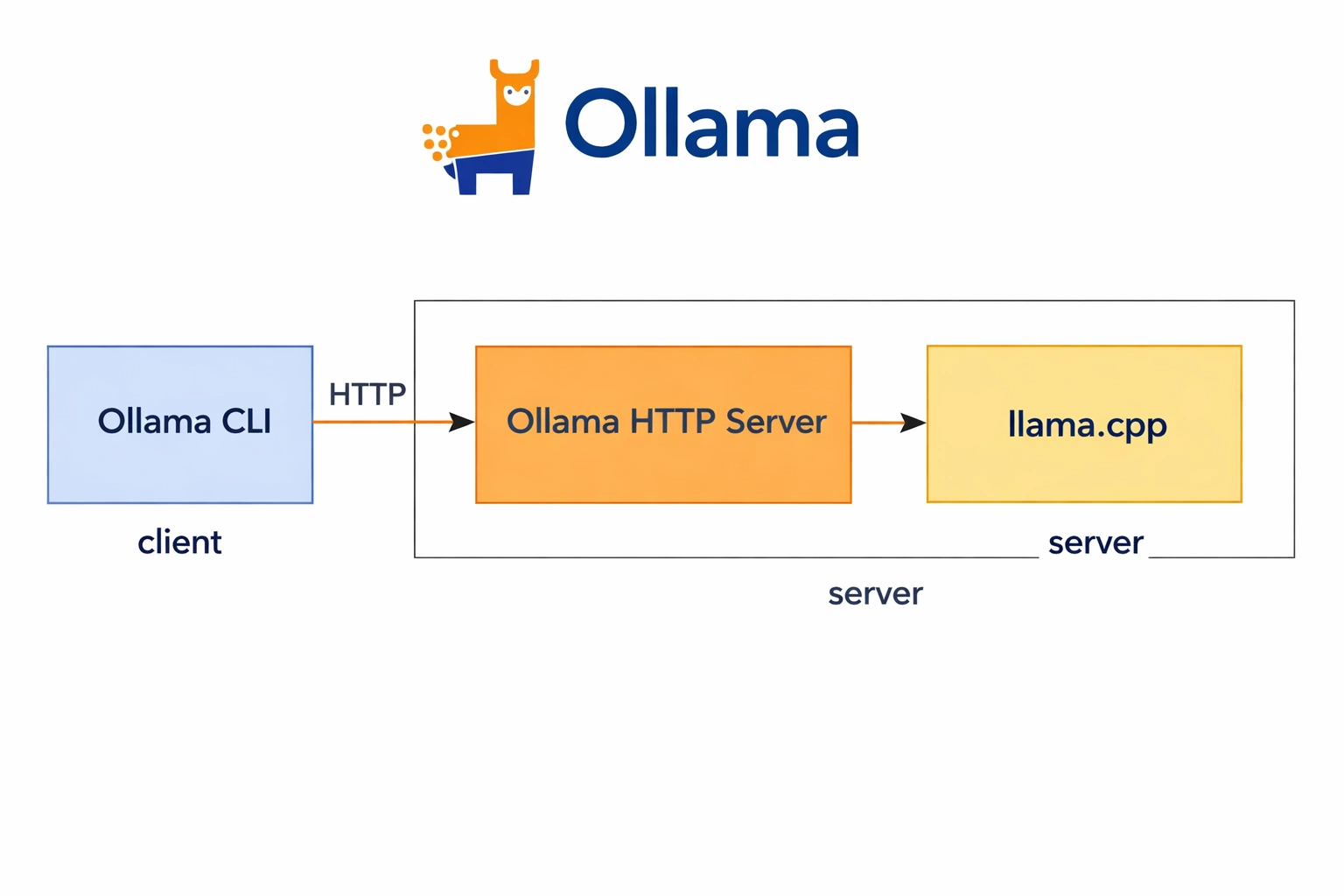
Ollama is a lightweight tool that helps you run large language models (LLMs) locally on your machine or server. Many teams use Ollama when they want secure local LLM deployment without relying on third-party cloud APIs. If you compare LM Studio vs Ollama, you will notice that Ollama focuses more on backend integration and production use.
Ollama gives developers and DevOps teams strong control over how they deploy and manage models. Engineering Managers evaluating local LLM deployment often choose Ollama because it fits easily into existing infrastructure. Startups building AI SaaS products also prefer Ollama when they need scalable and private AI deployment.
When businesses ask, “Which is better LM Studio or Ollama?” the answer often depends on whether they need a production-ready environment. Ollama supports enterprise AI apps that require performance, flexibility, and security.
Ollama uses a command-line interface (CLI) for model management. Developers install, run, and manage models using simple commands. This approach gives AI/ML engineers precise control over configurations. Teams that value automation and scripting benefit from this setup.
Ollama allows you to run models as a local API server. Developers connect their applications directly to the model through API endpoints. Product Owners building AI-powered products use this feature to integrate AI into web apps, SaaS platforms, and internal tools. This capability makes Ollama vs LM Studio performance stronger in production scenarios.
Ollama works smoothly with Docker. DevOps teams deploy models inside containers and maintain consistent environments across development and production. Companies concerned about data privacy in AI use Docker setups to maintain isolation and security.
Ollama supports backend systems and real-world application workflows. Enterprises exploring private AI deployment integrate Ollama into internal systems, CRMs, analytics platforms, or customer-facing apps. This makes Ollama vs LM Studio for production a common comparison among technical decision-makers.
Pros
Cons
Enterprises use Ollama to build private AI assistants for internal teams. Companies deploy models locally to answer HR queries, summarize reports, or assist with documentation. This approach ensures secure local LLM deployment and keeps sensitive company data inside the organization.
Many technical decision makers prefer Ollama vs LM Studio for enterprise use when privacy and compliance matter.
Startups building AI SaaS products integrate Ollama into their backend systems. Developers connect applications directly to Ollama’s API server and deliver AI features without relying on external APIs.
This setup gives better control over performance and cost. Teams comparing Ollama vs LM Studio for production often choose Ollama for scalable product environments.
Healthcare, FinTech, and legal companies deploy LLMs locally using Ollama. These industries require strong data protection and compliance. Ollama allows organizations to run models on private infrastructure.
Companies concerned about data privacy in AI rely on this approach to protect confidential data.
DevOps teams use Ollama in Docker-based environments. They containerize models and deploy them across staging and production systems. This setup supports automation, version control, and scaling.
Engineering Managers evaluating local LLM deployment often prefer Ollama because it integrates smoothly into CI/CD pipelines.
Private API Hosting for Custom AI Applications
Businesses host their own AI APIs using Ollama. Developers build custom chatbots, document analysis tools, or knowledge assistants and connect them to locally hosted models.
Organizations searching for how to deploy LLM locally in 2026 often implement this architecture to gain full infrastructure control.
If you are evaluating LM Studio vs Ollama for enterprise use or testing local AI tools for production, you need clarity beyond basic features. CTOs, AI/ML engineers, DevOps teams, and product leaders often ask: Which is better LM Studio or Ollama for long-term AI deployment?
Below is a practical LM Studio vs Ollama comparison based on real business needs, performance expectations, and secure local LLM deployment goals.
| Feature | LM Studio | Ollama |
|---|---|---|
| Installation | Simple desktop installation with GUI setup | Lightweight CLI installation with terminal setup |
| Ease of Use | Beginner-friendly interface | Developer-focused command-line workflow |
| API Support | Limited built-in API flexibility | Strong API support for app integration |
| Production Readiness | Better for testing and experimentation | Designed for backend and production deployment |
| Model Customization | Basic model configuration options | Advanced model control and fine-tuning flexibility |
| Enterprise Scalability | Limited large-scale deployment control | Supports scalable, service-based architecture |
| Security Control | Local model execution with manual controls | Stronger infrastructure-level security control |
| GPU Optimization | Good for local GPU usage | Better optimization for performance tuning |
LM Studio offers a quick desktop-style installation. You download the application, install it, and start running models locally within minutes. Many developers experimenting with open-source LLMs prefer this simplicity.
Ollama uses a command-line installation process. DevOps teams and AI engineers find this setup more flexible for automation and container-based environments. If you plan to deploy LLM locally in 2026 within structured infrastructure, Ollama gives you better control.
LM Studio provides a graphical interface. Product owners and startup teams appreciate its clean dashboard and model management features. You do not need deep command-line expertise to run models.
Ollama focuses on developers. It uses a CLI workflow that integrates easily into scripts and backend systems. Engineering managers evaluating local LLM deployment for scalable apps often prefer this structured approach.
API flexibility plays a critical role in Ollama vs LM Studio performance at the application level.
LM Studio supports local inference, but it offers limited API extensibility for complex production systems.
Ollama provides stronger API capabilities. You can integrate it directly into AI-powered SaaS products, internal enterprise tools, or secure microservices architecture. This advantage makes Ollama more suitable for production-based AI applications.
If you compare Ollama vs LM Studio for production, the difference becomes clear.
LM Studio works best for prototyping, testing, and experimentation. It helps teams validate AI use cases quickly.
Ollama supports backend deployment scenarios. It allows structured local LLM hosting and service-level integration. Enterprises exploring private AI deployment often choose Ollama for this reason.
LM Studio allows you to download and run different models with basic configuration options. It simplifies experimentation but limits deeper customization.
Ollama supports advanced configuration and better control over model parameters. AI/ML engineers building AI-powered products benefit from this flexibility. If you require custom workflows or performance tuning, Ollama provides stronger capabilities.
When CTOs evaluate LM Studio vs Ollama for enterprise use, scalability becomes a key factor.
LM Studio focuses on individual systems and local usage. It does not naturally support multi-environment deployment at scale.
Ollama integrates more smoothly with enterprise infrastructure. DevOps teams can deploy it within containers, internal networks, or hybrid environments. Companies building AI SaaS products often choose Ollama for scalable growth.
Both tools run models locally, which improves privacy compared to public cloud APIs. This setup supports companies concerned about data privacy in AI.
However, Ollama offers better infrastructure-level control. You can integrate it within secure environments, manage access layers, and enforce policies more efficiently. Businesses aiming for secure local LLM deployment often find Ollama more adaptable.
LM Studio efficiently uses local GPU resources for personal or experimental workloads.
Ollama provides more flexibility for performance tuning and resource allocation. AI teams focusing on Ollama vs LM Studio performance benchmarks often report better optimization control in structured deployment setups.
When CTOs and AI/ML engineers evaluate LM Studio vs Ollama, performance becomes a critical factor. Teams want fast responses, efficient hardware usage, and stable handling of large models.
Both tools allow you to run LLM locally, but they serve different goals.
LM Studio focuses on ease of use. It delivers smooth performance for prototyping, experimentation, and small-to-medium models. Developers experimenting with open-source LLMs often prefer its GUI for quick testing.
Ollama focuses on backend integration and production workflows. Many engineering managers evaluating local LLM deployment prefer Ollama because it runs as a lightweight service and supports API-based integration. In production environments, teams often report more consistent performance under load with Ollama.
If you ask, which is better LM Studio or Ollama for speed? The answer depends on your use case. LM Studio works well for local experimentation, while Ollama vs LM Studio performance comparisons often favor Ollama in scalable environments.
GPU optimization plays a major role in choosing the best local LLM tool in 2026.
LM Studio provides easy GPU configuration through its interface. It helps startups building AI SaaS products quickly allow acceleration without deep infrastructure tuning.
Ollama gives DevOps teams more control. Teams handling private AI infrastructure can configure GPU allocation more precisely and integrate it with Docker or orchestration tools. This flexibility makes Ollama vs LM Studio for production discussions more relevant for enterprise-scale AI systems.
If your team prioritizes tight infrastructure control, Ollama usually provides more flexibility.
Memory usage becomes critical when companies deploy LLMs on limited hardware.
LM Studio manages memory automatically and simplifies model switching. Product owners building AI-powered products often use it during early development stages.
Ollama allows deeper configuration. Enterprises exploring private AI deployment benefit from better process isolation and resource control. DevOps teams can fine-tune memory allocation based on workload demands.
For secure local LLM deployment in controlled environments, fine-grained memory control often makes a difference.
Large model handling defines real-world scalability.
LM Studio supports popular open-source models and performs well for moderate model sizes. It suits teams that want to test models before full deployment.
Ollama handles larger models more effectively in service-based setups. Many organizations comparing LM Studio vs Ollama for enterprise use choose Ollama when they need backend integration, API serving, and production-grade scaling.
If you plan to deploy LLM locally in 2026 for customer-facing applications, Ollama often aligns better with long-term scaling strategies.
Data privacy drives most decisions around local AI adoption. Companies concerned about data privacy in AI want full control over their models and infrastructure.
Both tools support local deployment. You can run LLM locally without sending data to external APIs.
LM Studio allows straightforward on-device setup for individual machines. Startups and developers often use it for secure internal testing.
Ollama integrates more naturally into on-premise server environments. Enterprises that require centralized control often choose Ollama for structured deployment.
Data isolation protects sensitive business information.
LM Studio runs models locally on the user’s system. This setup ensures that data remains on the machine unless the user connects external services.
Ollama allows service-level isolation. DevOps teams can deploy it inside containers or private networks. This structure improves control when multiple applications access the model.
In LM Studio vs Ollama comparison discussions, enterprises often favor Ollama for multi-user environments where isolation policies matter.
Enterprise control includes monitoring, logging, access management, and integration.
LM Studio focuses on simplicity. It works well for individual users and small teams.
Ollama supports API endpoints and backend integration. Engineering managers evaluating local LLM deployment often choose Ollama because they can integrate it into existing architecture and control access programmatically.
For Ollama vs LM Studio for enterprise use, the ability to manage and monitor AI services at scale becomes a major differentiator.
Regulated industries require strict compliance with data protection standards.
Both tools support secure local LLM deployment by keeping data within private infrastructure. However, enterprises must design the surrounding architecture properly.
Ollama often fits compliance-focused environments better because teams can deploy it in controlled server environments with access controls, logging systems, and network policies.
If your organization handles financial, healthcare, or regulated data, you should evaluate LM Studio vs Ollama for production with compliance planning in mind.
Read Also: How to Deploy Large Language Models?
When comparing LM Studio vs Ollama, you should not look for one universal winner. You should choose the tool based on your technical goals, scalability needs, and security requirements. Let’s break it down clearly.
If you are a developer experimenting with open-source LLMs, you may prefer LM Studio.
LM Studio offers a clean graphical interface. You can download and run models quickly. You do not need deep DevOps knowledge to get started. You can test prompts, evaluate responses, and compare models in a simple environment.
If your goal is learning, testing, or prototyping, LM Studio works well. It reduces setup complexity and helps you run an LLM locally without heavy configuration.
However, if you want API access and backend integration, Ollama gives you more flexibility. Many developers choose Ollama when they want to move beyond experimentation.
So, in the LM Studio vs Ollama comparison, LM Studio fits beginners and solo developers, while Ollama suits developers who plan to build applications.
If you are building an AI SaaS product, you must think beyond experimentation. You must focus on scalability, automation, and integration.
Ollama supports API-based deployment. You can integrate it directly into your backend systems. You can containerize it using Docker and manage deployments more efficiently. This setup makes Ollama a strong candidate for startups building AI-driven products.
When founders ask, “Which is better LM Studio or Ollama?” the answer depends on production needs. LM Studio helps during the prototype stage. Ollama supports production-ready environments.
In terms of Ollama vs LM Studio performance, Ollama often performs better in structured backend workflows. It handles automation and repeated inference tasks more effectively.
If you want to deploy LLM locally in 2026 and scale your AI product, Ollama gives you a more future-ready foundation.
Enterprises must evaluate tools differently. CTOs, engineering managers, and DevOps teams must consider security, monitoring, governance, and long-term scalability.
Ollama provides better flexibility for enterprise AI deployment. You can host it on private infrastructure. You can connect it to internal systems. You can manage access controls and APIs more easily.
In the discussion of LM Studio vs Ollama for enterprise use, Ollama usually stands out. LM Studio focuses more on local testing and desktop-based workflows. It does not offer the same level of production integration.
Enterprises that compare Ollama vs LM Studio for production often choose Ollama because it supports structured deployments and automation pipelines.
If your company plans secure local LLM deployment at scale, you should treat Ollama as a stronger production tool.
Companies in healthcare, fintech, insurance, and government must prioritize data privacy. They must ensure strict compliance and controlled infrastructure.
Both tools allow you to run LLM locally. This approach improves data control compared to public cloud APIs. However, enterprises in regulated industries require more than local execution.
You must implement secure architecture, role-based access, logging, and audit trails. Ollama provides more flexibility for integrating with secure infrastructure and private servers.
When leaders evaluate the best local LLM tool for compliance-heavy environments, they often look at deployment control and API security. Ollama supports structured private hosting more effectively.
If your company focuses on secure local LLM deployment and strict compliance, you should evaluate Ollama within a broader enterprise architecture strategy.
Many teams compare LM Studio vs Ollama to decide the best local LLM tool. Both tools help you run LLMs locally in 2026. However, they may not fully support complex business needs.
If you are a CTO, engineering manager, or product owner building AI-powered products, you must look beyond a basic LM Studio vs Ollama comparison. These tools work well for experimentation and small-scale deployment. They do not always support enterprise-grade performance, deep customization, or long-term scalability.
LM Studio focuses on simplicity and local experimentation. Ollama supports API integration and backend usage. Still, both tools have limitations when you move toward production.
If you evaluate Ollama vs LM Studio performance for enterprise use, you will notice gaps in workload balancing, distributed scaling, and advanced security architecture.
You should choose a custom LLM deployment when:
Startups building AI SaaS products often begin with LM Studio or Ollama. As they grow, they need stronger performance, better orchestration, and controlled scaling.
Enterprises exploring private AI deployment also require architecture that supports thousands of requests, role-based access control, logging, and audit systems.
Pre-packaged setups do not always deliver optimal speed or efficiency. A custom deployment allows you to optimize GPU usage, memory allocation, and inference pipelines.
You can improve latency.
You can reduce infrastructure cost.
You can increase response reliability under heavy load.
If you ask, “Which is better, LM Studio or Ollama for production?” the answer depends on your scale. For serious production workloads, custom optimization often delivers better long-term results.
Generic open-source models do not fully understand your business data. Fine-tuning helps you train models on domain-specific datasets.
You can improve accuracy for finance, healthcare, legal, or SaaS use cases.
You can reduce hallucinations.
You can align outputs with your brand voice and compliance policies.
AI/ML engineers and DevOps teams often need deeper customization than default model configurations allow. A custom approach gives you full control over model behavior.
Security becomes critical when you deploy AI in production. Companies concerned about data privacy in AI must design secure infrastructure from day one.
A custom architecture allows you to:
A structured architecture also supports secure local LLM deployment without exposing internal APIs or sensitive information.
Small setups work for individual developers. Large organizations require structured scaling.
You need:
When engineering managers evaluate LM Studio vs Ollama for enterprise use, they often realize that scaling across departments requires additional tooling and infrastructure.
A custom deployment supports collaboration between product teams, AI engineers, and DevOps teams without performance bottlenecks.
Read Also: How to Build a Private LLM for Enterprise Applications?
| Scenario | LM Studio | Ollama |
|---|---|---|
| Beginner developers | ✅ Easy setup | ⚠ Requires CLI comfort |
| AI/ML engineers | ⚠ Limited control | ✅ Strong customization |
| Running LLM locally for testing | ✅ Excellent | ✅ Very good |
| Production deployment | ❌ Not ideal | ✅ Recommended |
| Enterprise AI integration | ⚠ Limited | ✅ Strong fit |
| Secure local LLM deployment | ⚠ Basic | ✅ Better control |
| API-based integration | ❌ Minimal | ✅ Built-in API support |
| DevOps automation | ❌ Limited | ✅ CI/CD friendly |
LM Studio helps developers and startups move quickly.
Ollama works better for production environments and structured deployments. Many teams comparing Ollama vs LM Studio for production prefer Ollama because it supports automation and backend integration.
When teams compare LM Studio vs Ollama, they usually ask one core question: Which is the best local LLM tool for our use case in 2026?
The answer depends on your technical maturity, deployment goals, and security needs.
If you are testing ideas or experimenting with open-source models, one tool works well. If you are building production-ready AI systems, the other may serve you better.
Let’s break it down clearly.
LM Studio
Ollama
The comparison between LM Studio vs Ollama in 2026 depends on your goals rather than just features. LM Studio offers a simple, user-friendly way to run LLM locally, which makes it ideal for developers, startups, and teams focused on experimentation or rapid prototyping. It helps users get started quickly without complex configuration.
Ollama, on the other hand, provides stronger control, API support, and better production readiness. It suits AI/ML engineers, DevOps teams, and enterprises building scalable AI-powered products. Organizations evaluating secure local LLM deployment or production integration often prefer Ollama for its flexibility and automation support.
Ultimately, tools alone do not ensure long-term success. Enterprise-grade AI requires proper architecture, security planning, and scalability strategy. Partnering with a trusted AI development company that delivers end-to-end AI software development services ensures your local LLM deployment remains secure, efficient, and future-ready.
Our team is always eager to know what you are looking for. Drop them a Hi!

Ruchir Shah is the Microsoft Department Head at Zealous System, specializing in .NET and Azure. With extensive experience in enterprise software development, he is passionate about digital transformation and mentoring aspiring developers.




Comments