
Node.js is an open source JavaScript runtime that lets developers run JavaScript outside a browser, on a server. Its event-driven, non-blocking I/O model is why teams choose it for APIs, real-time features, and applications that handle many concurrent connections at once. This article walks through how Node.js actually works, when it’s a strong fit, when it isn’t, and how to decide whether it belongs in your next project.
If you’re a CTO, founder, or product leader comparing backend options, the goal here isn’t to convince you Node.js is always right. It’s to give you enough technical grounding to make that call yourself, or to brief a development partner with confidence.
| What it is | An open source JavaScript runtime built on Chrome’s V8 engine |
| Primary language | JavaScript (TypeScript is widely used alongside it) |
| Architecture | Single-threaded event loop with a non-blocking I/O model, backed by a worker pool for certain system operations |
| Best suited for | I/O-heavy, API-driven, and real-time applications |
| Popular use cases | REST/GraphQL APIs, chat and collaboration tools, streaming, SaaS backends, microservices |
| Major advantage | High concurrency with efficient handling of many simultaneous I/O operations |
| Main limitation | Not ideal for CPU-heavy, compute-intensive workloads unless specifically architected around them |
| Common frameworks | Express.js, NestJS, Fastify |
| Package ecosystem | npm, the largest package registry for any single language ecosystem |
| Best for businesses that | Need to ship APIs or real-time features quickly, already use JavaScript/TypeScript, and expect variable or high concurrent traffic |
Node.js is a JavaScript runtime environment, not a programming language and not a framework. It takes the V8 engine that powers Google Chrome and embeds it in a standalone program that can run JavaScript directly on a server or in any environment outside a browser.
That distinction matters because it shapes what Node.js actually does for you. It doesn’t impose a particular application structure the way a framework does. It gives you a runtime with an event-driven, non-blocking I/O model, access to the file system and network, and the npm package ecosystem to pull in the tools you need. Frameworks like Express.js or NestJS are built on top of Node.js; Node.js itself is the foundation they run on.
A Node.js application handles requests through an event loop: a single thread that continuously checks for and processes events, such as incoming HTTP requests, without waiting idly for slow operations to finish.
Here’s the practical flow:
This is where “Node.js is single-threaded” gets oversimplified. Your application code runs on a single main thread, which is why long, synchronous, CPU-heavy code can block everything else. But Node.js itself relies on a thread pool (via libuv) for certain operations, and it supports worker threads for running genuinely CPU-intensive JavaScript in parallel when needed. The accurate picture is: single-threaded application code, multi-threaded runtime underneath it.
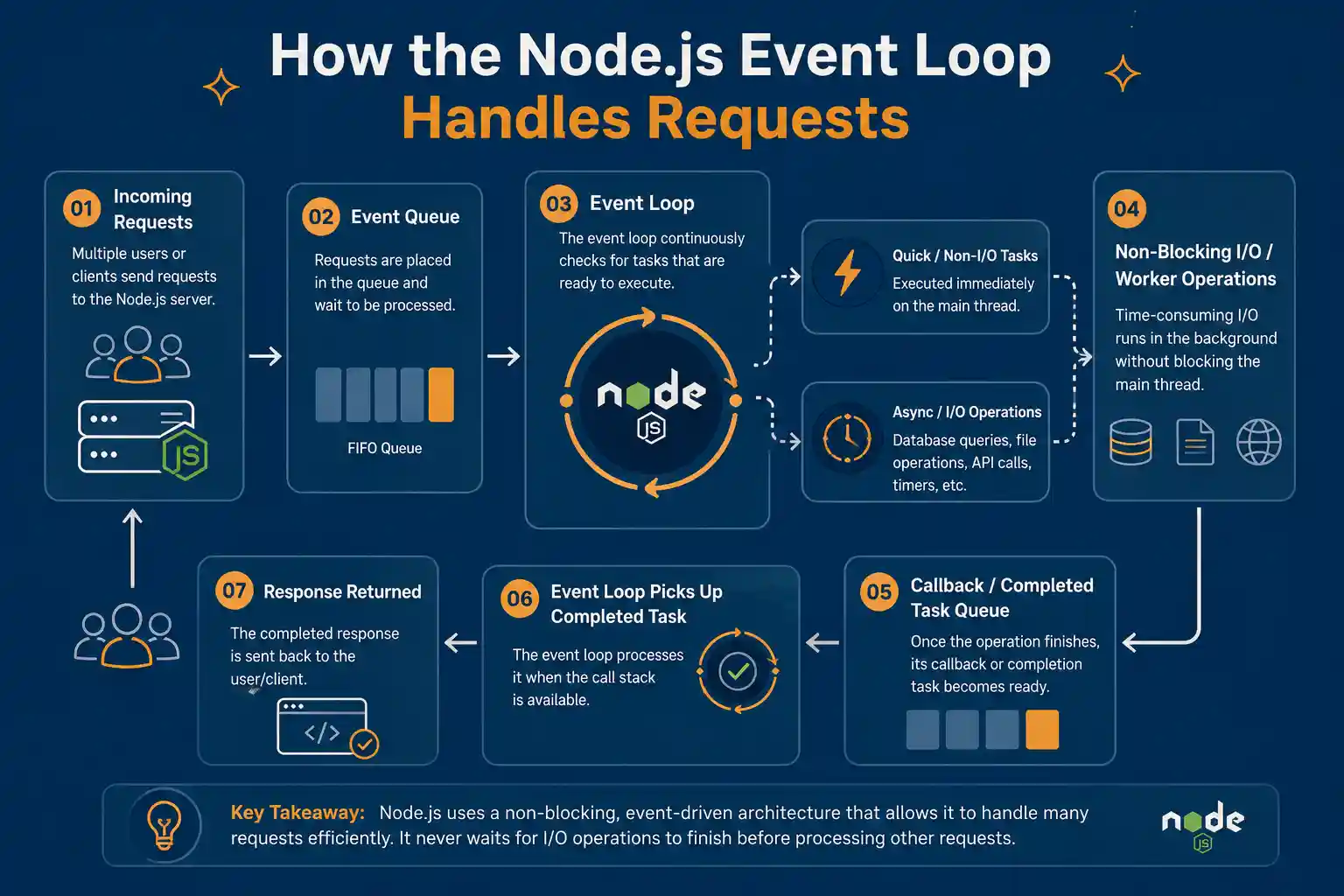
Because Node.js doesn’t wait on one operation before starting the next, it can hold many simultaneous connections open efficiently. This matters for applications like chat platforms or live dashboards, where hundreds or thousands of clients may be connected at once but each individual request is lightweight.
Teams that already build with JavaScript or TypeScript on the frontend can use the same language on the backend. This reduces context-switching for developers and can simplify hiring, code review, and shared tooling like linters and type definitions.
Applications that spend most of their time waiting on a database, a file system, or a third-party API (rather than doing heavy computation) tend to run efficiently on Node.js, because the runtime is built specifically to avoid wasting time on those waits.
npm is the largest package registry available to any single language ecosystem, which means common functionality (authentication, validation, logging, ORM layers) rarely needs to be built from scratch. This speeds up initial development, though it also means dependency management needs active governance (more on that in the security section).
Combined with WebSockets, Node.js’s event-driven model is well suited to features that need to push data to clients as it happens, such as live notifications, collaborative editing, or tracking dashboards.
Node.js handles JSON natively and pairs well with REST and GraphQL API patterns, which is why it’s commonly used to build the API layer that mobile apps, single-page applications, and third-party integrations all depend on.
Individual Node.js services tend to be lightweight to start and run, which fits well with microservices patterns where many small, independently deployable services communicate over APIs. (Whether microservices are the right architecture at all is a separate question, addressed later in this article.)
Between shared JavaScript/TypeScript skills, mature frameworks, and npm packages, teams can often move from concept to working prototype faster than in ecosystems with more ceremony or boilerplate. This isn’t a guarantee, and it depends heavily on team experience and code quality practices.
Node.js applications scale horizontally in the same way most modern cloud-native applications do: through load balancing, containerization (Docker, Kubernetes), and stateless service design. Node.js doesn’t automatically make an application scalable; it’s compatible with the same scaling patterns used across the industry.
According to the 2025 Stack Overflow Developer Survey, Node.js was used by roughly 49% of professional developers who responded, making it the most-used web technology in that year’s survey (Stack Overflow Developer Survey 2025). That level of adoption means a large pool of available developers, extensive documentation, and continued investment in the runtime itself.
Node.js performs best in I/O-bound applications, where the system spends more time waiting for databases, APIs, or external services than performing heavy computations.
Its event-driven, non-blocking I/O architecture allows it to handle many concurrent connections efficiently, making Node.js development a strong choice for APIs, real-time platforms, SaaS products, and scalable backend systems.
Node.js is well suited for building REST and GraphQL APIs, particularly when requests involve databases or external services. Its asynchronous architecture allows the server to handle other requests while waiting for these operations to complete.
Chat apps, collaboration platforms, live dashboards, and notification systems often require many persistent connections. Node.js handles these real-time applications efficiently and works well with technologies such as WebSockets for fast, two-way communication.
Node.js can process data in chunks rather than loading an entire payload into memory. This makes it suitable for video and audio streaming, large file transfers, data pipelines, and other streaming workloads.
SaaS platforms often rely on APIs, authentication, webhooks, and third-party integrations. Node.js backend development is a good fit for building these API and integration layers while handling multiple concurrent requests efficiently.
eCommerce applications handle product searches, inventory checks, cart updates, payments, and order processing simultaneously. Node.js can efficiently manage these mostly I/O-bound operations, making it suitable for scalable eCommerce backends.
IoT platforms often process frequent messages from large numbers of connected devices and sensors. Node.js’s lightweight, event-driven architecture makes it effective for managing simultaneous connections and near-real-time data.
Node.js is commonly used for building microservices because services can remain lightweight and independently deployable. Its strong API support also makes communication between individual services straightforward.
A Backend-for-Frontend layer collects data from multiple APIs or microservices and prepares it for a specific client. Node.js handles these asynchronous service calls efficiently, helping simplify communication between frontend and backend systems.
Node.js is also a strong choice for serverless application development. Its lightweight runtime works well for API endpoints, webhook processing, scheduled tasks, file processing, and event-driven functions.
Overall, Node.js application development works particularly well for applications that require high concurrency, frequent API calls, real-time communication, and I/O-heavy operations. CPU-intensive workloads may require worker threads or specialized backend technologies.
| Industry | Potential Application | How Node.js Helps |
|---|---|---|
| SaaS | Multi-tenant platform APIs and integrations | Handles many concurrent API calls efficiently and integrates easily with third-party services |
| FinTech | Real-time transaction dashboards, payment API layers | Non-blocking I/O supports high-concurrency transaction processing and live data updates |
| Healthcare | Patient portals, appointment and notification systems | Real-time notifications and API-driven integration with health record systems |
| eCommerce | Product catalog APIs, checkout and inventory services | Efficiently manages high volumes of concurrent, mostly I/O-bound requests during peak traffic |
| Logistics | Shipment tracking and fleet monitoring dashboards | Well suited to streaming location and status updates in near real time |
| Education | Learning management systems, live classroom tools | Supports real-time collaboration features like live chat, shared documents, and notifications |
| IoT | Device telemetry ingestion and monitoring dashboards | Handles many small, frequent messages from connected devices efficiently |
| Real-time collaboration | Shared editing tools, whiteboards, project dashboards | Event-driven architecture and WebSockets support live, multi-user updates |
A well-planned Node.js architecture helps modern web applications remain scalable, maintainable, and responsive as traffic and functionality grow. While the exact technology stack depends on project requirements, a typical Node.js web application architecture includes:
Modern JavaScript frameworks such as React, Angular, or Vue.js are commonly used to build responsive and interactive user interfaces.
Node.js serves as the backend runtime, handling server-side logic, incoming requests, database communication, and integrations with external services.
Frameworks such as Express.js, NestJS, or Fastify can be used depending on application complexity, performance requirements, and development preferences.
REST or GraphQL APIs connect the frontend with backend services and allow applications to exchange data efficiently.
For features such as live chat, notifications, tracking, or collaboration, WebSockets can provide real-time, two-way communication between clients and servers.
Depending on data structure and consistency requirements, a Node.js application may use PostgreSQL, MySQL, or MongoDB for storing and managing application data.
Redis is commonly used to cache frequently accessed data, reduce database queries, and improve overall application performance.
Node.js applications can be hosted on cloud platforms such as AWS, Microsoft Azure, or Google Cloud, providing flexible infrastructure and scalability.
Docker helps package applications consistently across environments, while Kubernetes can be introduced when application scale and deployment complexity justify container orchestration.
An automated CI/CD pipeline helps teams test, build, and deploy Node.js applications more reliably while reducing manual deployment effort.
Application performance monitoring and centralized logging help development teams track errors, identify performance issues, and maintain application reliability.
Together, these components create a flexible Node.js application architecture that can support everything from modern web applications and APIs to SaaS platforms and enterprise systems.
Not every Node.js application needs all of these pieces. A small internal tool or an early-stage MVP might run comfortably on a single server with a simple database and no container orchestration at all. Architecture should follow actual requirements, not assumptions about what a “real” Node.js application needs.
Real-time features, chat, live dashboards, collaborative editing, notifications, are one of the areas where Node.js’s design shows up most directly. WebSockets keep a persistent connection open between client and server, and Node.js’s event-driven, non-blocking model lets a single server instance manage many of those open connections without dedicating a thread to each one.
A practical example: a project management tool where multiple team members edit a shared board at once. Each user’s browser holds a WebSocket connection open; when one user moves a card, the server needs to broadcast that change to every other connected client immediately. Node.js’s architecture is built for exactly this kind of many-small-events workload.
Node.js is a common choice for building REST APIs, GraphQL APIs, API gateways, and backend-for-frontend layers. A few reasons this pairing works well:
Node.js fits microservices patterns reasonably well: services tend to start quickly, run with a small footprint, and communicate easily over HTTP or message queues. Combined with containers, this makes it straightforward to deploy, scale, and update services independently.
That said, microservices are not automatically the better architecture simply because Node.js supports them. Microservices introduce real operational complexity: service discovery, distributed tracing, network reliability between services, and more moving parts to deploy and monitor. For many products, especially earlier-stage ones, a modular monolith (a single deployable application organized into clearly separated internal modules) is often a more practical starting point. It keeps operational overhead low while still allowing the codebase to be organized cleanly enough to split into services later if scale genuinely requires it.
| Advantages | Limitations |
|---|---|
| Strong asynchronous I/O handling for high-concurrency workloads | CPU-intensive workloads need careful architecture, or they can block the event loop |
| JavaScript/TypeScript across the full stack | Poorly managed async code can become difficult to reason about |
| Large npm ecosystem speeds up common functionality | Large dependency trees introduce supply-chain and security risk that need active governance |
| Well suited to real-time applications | Not every workload benefits from Node.js’s I/O-focused design |
| Efficient for API and microservices development | Requires disciplined error handling in asynchronous code paths |
| Large, active developer community | Long-running, compute-heavy tasks may need to be offloaded to worker threads or a different service entirely |
While Node.js works well for many modern web applications, it may not be the best choice for every backend workload. In some scenarios, another technology can provide better performance or a stronger development ecosystem.
Node.js may not be ideal for workloads involving intensive computation, such as video encoding, complex image processing, or large-scale numerical calculations. These tasks can block the event loop and affect application performance unless they are handled using worker threads or separate services.
For scientific computing, advanced data analysis, or large-scale data processing, technologies such as Python often provide more mature libraries and specialized tools, including NumPy and pandas.
While Node.js can integrate with AI services and APIs, Python is generally better suited for developing machine learning models and data pipelines due to its extensive AI and ML ecosystem.
If your development team has limited experience with JavaScript or TypeScript on the backend, adopting Node.js may introduce an additional learning curve. In such cases, using a familiar backend technology may lead to faster and more maintainable development.
Ultimately, choosing Node.js for backend development should depend on your application architecture, workload, performance requirements, and your development team’s technical expertise.
In these cases, alternatives like Python, Java, or Go may be a better starting point depending on the specific workload and team background. None of these languages is universally better than Node.js; the right choice depends on what the application actually needs to do.
| Factor | Node.js | Python | Java | .NET |
|---|---|---|---|---|
| Language | JavaScript/TypeScript | Python | Java | C# |
| Concurrency model | Event-driven, non-blocking I/O | Traditionally thread/process-based, with async support (asyncio) | Thread-based, with reactive/async options | Thread-based, with async/await support |
| Typical strength | I/O-heavy, real-time, API-driven applications | Data science, AI/ML, rapid scripting, general backend | Large-scale enterprise systems, high reliability requirements | Enterprise systems, especially in Microsoft-centric environments |
| CPU-heavy workloads | Requires careful architecture (worker threads or offloading) | Strong, especially with C-backed libraries like NumPy | Strong, mature JVM performance tooling | Strong, mature CLR performance tooling |
| Real-time applications | Strong fit | Possible, less common as a default choice | Possible with additional frameworks | Possible with SignalR and similar tooling |
| Ecosystem | npm, the largest package registry available | PyPI, especially strong for AI/ML and data tooling | Mature enterprise libraries, long track record | Strong first-party tooling within the Microsoft stack |
| Typical use cases | APIs, real-time apps, microservices, SaaS backends | Data pipelines, AI/ML, automation, general web backends | Large enterprise systems, banking, high-reliability platforms | Enterprise applications, Windows-integrated systems |
The right choice depends on your workload type, existing team expertise, current infrastructure, scalability requirements, security and compliance needs, timeline, and long-term maintenance plans, not on which technology is fastest in a benchmark.
| Framework | Best Suited For | Strength | Considerations |
|---|---|---|---|
| Express.js | Lightweight APIs and simple web applications | Minimal, flexible, huge community and middleware ecosystem | Provides less built-in structure, so larger teams need to enforce their own conventions |
| NestJS | Structured, enterprise-scale applications | Opinionated architecture, strong TypeScript support, built-in dependency injection | Steeper learning curve for teams new to its patterns |
| Fastify | Performance-sensitive APIs | Low overhead, schema-based validation, strong plugin architecture | Smaller ecosystem than Express, though actively growing |
Security in a Node.js application depends on implementation, dependency management, and configuration, not on the runtime alone. Key areas to address:
npm audit or a software composition analysis tool, and pin versions with a lockfile to avoid unexpected upstream changesFor authoritative, continuously updated guidance, see the OWASP Node.js Security Cheat Sheet and the official Node.js security best practices documentation.
Building a fast Node.js application requires more than choosing the right framework. Following proven Node.js performance and scalability best practices can help applications handle growing traffic while maintaining speed and reliability.
Keep long-running synchronous operations away from the main event loop, as they can delay other requests and reduce overall application performance.
Use asynchronous and non-blocking APIs consistently for database queries, file operations, and external service calls to improve concurrency.
Use Redis or another in-memory caching solution to store frequently requested data, reduce database queries, and improve response times.
Optimize database queries, add appropriate indexes, and use connection pooling to manage database connections efficiently under higher traffic.
Distribute incoming requests across multiple Node.js application instances using load balancing to improve availability and handle increased traffic.
Instead of relying only on a larger server, use horizontal scaling to run multiple application instances as demand increases.
Move heavy computations to worker threads or separate services so they do not block the Node.js event loop.
Use job queues for email processing, report generation, data imports, and other long-running tasks instead of processing them within user requests.
Track memory consumption, CPU usage, response times, errors, and event-loop latency to identify performance bottlenecks early.
Serve images, JavaScript, CSS, and other static files through a Content Delivery Network (CDN) to reduce server load and improve delivery speed.
Using Docker containers can improve consistency across environments and simplify application deployment and scaling.
Ongoing Node.js application performance monitoring helps teams identify issues, optimize resource usage, and maintain performance as traffic and application complexity grow.
None of these should be applied preemptively without evidence they’re needed. Optimizing for a scale you haven’t reached yet usually costs more than it saves.
Node.js itself is open source and free to use. What determines actual project cost is everything built around it:
| Project Type | Typical Complexity | Major Cost Drivers | Approximate Timeline* |
|---|---|---|---|
| MVP / early-stage product | Low to moderate | Core feature set, basic integrations, simple UI | A few weeks to a few months |
| Mid-size SaaS platform | Moderate to high | Multi-tenant architecture, third-party integrations, real-time features | Several months |
| Enterprise application | High | Compliance requirements, complex integrations, high availability needs | Several months to a year or more |
*Timelines and cost ranges vary significantly by scope, team structure, and region. Treat these as directional estimates, not quotes; an accurate figure requires a scoped discovery conversation.
A structured Node.js web application development process helps ensure the application is scalable, secure, and aligned with business requirements from planning through deployment.
Start by defining the application’s goals, target users, core features, technical requirements, and expected outcomes.
Plan the overall Node.js application architecture, including services, database structure, APIs, integrations, and data flows.
Choose the right Node.js frameworks, database, frontend technologies, and cloud infrastructure based on the application’s actual requirements.
Create wireframes and prototypes to define the user experience, navigation, and interface before moving into full development.
Build the core business logic, server-side functionality, and REST or GraphQL APIs that power the application.
Connect the frontend interface with backend APIs to enable smooth data exchange and application functionality.
Set up database schemas, indexes, relationships, and efficient data access patterns to support performance and scalability.
Apply Node.js security best practices throughout development, including authentication, authorization, data protection, input validation, and API security.
Perform unit, integration, and end-to-end testing to identify functional, performance, and security issues before release.
Deploy the application to a staging environment for final validation before moving it into the production environment.
Set up application performance monitoring and alerts to track errors, response times, resource usage, and potential performance issues.
Continue with bug fixes, dependency updates, security patches, performance optimization, and Node.js application scaling as traffic and business requirements grow.
Node.js may be a strong fit if:
Consider alternatives if:
Zealous System builds Node.js web applications, APIs, and real-time features for clients across fintech, insurance, telecom, healthcare, EdTech, travel, and real estate. Our work spans backend and API development, real-time application features, third-party integrations, frontend integration with React and Angular, database architecture, and cloud deployment, along with ongoing maintenance and support after launch.
If you’re evaluating whether Node.js fits your next project, or you’ve already decided and need a team to build for Node.js development services, that’s a conversation worth having early, before architecture decisions are locked in.
Node.js is a strong choice for applications that are I/O-heavy, API-driven, real-time, or need to scale across many concurrent connections. It is not automatically the right choice for every workload, particularly compute-heavy applications that would benefit more from a different runtime or architecture. The right decision depends on your specific application, your team’s existing expertise, and your infrastructure, not on which technology has the most enthusiastic advocates.
If you’ve worked through the checklist above and Node.js looks like a fit, the next step is scoping the architecture against your actual requirements.
Node.js is used to build the backend of web applications, including APIs, real-time features like chat and live dashboards, and server-side logic for SaaS platforms. Its non-blocking I/O model makes it well suited to applications that handle many concurrent requests, particularly those that spend more time waiting on databases or external services than performing heavy computation.
Businesses use Node.js because it lets teams build APIs and real-time features efficiently while using JavaScript or TypeScript across both frontend and backend. This can simplify hiring and code sharing, while the runtime’s event-driven design suits applications with high concurrent traffic or real-time requirements.
The main benefits include efficient handling of high-concurrency, I/O-heavy workloads, one language across the full stack, a large npm ecosystem, strong support for real-time features via WebSockets, and good compatibility with API-driven and microservices architectures.
Yes, for applications that are API-driven, real-time, or I/O-heavy, such as SaaS platforms, chat tools, and streaming services. It’s less suited to applications built around heavy, sustained computation, where a different runtime or a dedicated compute service may perform better.
Node.js can support large-scale applications when paired with sound architecture: load balancing, horizontal scaling, caching, and, where appropriate, a microservices or modular monolith design. Scalability comes from architecture decisions, not from the runtime alone.
Yes. Node.js’s event-driven, non-blocking model combined with WebSockets is one of its strongest use cases, commonly used for chat applications, live dashboards, collaborative tools, and notification systems.
Node.js can struggle with CPU-intensive workloads that block the single-threaded event loop, requires disciplined dependency management to manage npm supply-chain risk, and can become harder to maintain if asynchronous code isn’t structured carefully.
Node.js is primarily used on the backend, as a server-side JavaScript runtime. JavaScript itself is also used on the frontend (in the browser), which is why Node.js enables teams to use one language across both layers, but Node.js itself is not a frontend technology.
Neither is universally better. Node.js tends to fit I/O-heavy, real-time, and API-driven applications well, while Python is often preferred for data-heavy, AI/ML, or scientific computing workloads. The right choice depends on your application’s workload type and your team’s existing expertise.
Node.js itself is free and open source. Actual project cost depends on application complexity, integrations, real-time requirements, infrastructure, security and compliance needs, and team structure. Costs and timelines should be treated as estimates until a project is scoped in detail.
Our team is always eager to know what you are looking for. Drop them a Hi!

Meet Prashant Suthar, a Sr. Software Developer at Zealous System. With a passion for building elegant code and solving complex problems, Prashant transforms ideas into digital solutions that drive business success.


Comments