
Building an AI app in 2026 means working with the most capable, affordable, and developer-friendly set of tools in the history of software. Foundation models from Anthropic, OpenAI, Google, and Meta have dropped in cost by over 90% since 2023, support million-token context windows, and handle text, images, audio, and documents natively. What once required a dedicated ML team can now be built and deployed by a single developer in days. The infrastructure layer including vector databases, orchestration frameworks, and evaluation tools has matured from experimental to production-grade.
But accessibility has raised the bar, not lowered it. Users in 2026 have experienced enough AI products to know the difference between a demo that impresses once and a product that works reliably every time. Shipping a great AI app today means solving for consistency, latency, accuracy, and trust, not just capability. The developers winning in this space are the ones who understand how to architect AI systems that behave predictably at scale, not just how to make an API call.
This guide covers the complete process of building a production-ready AI app in 2026, from choosing the right foundation model and designing your data pipeline, to building agentic workflows, evaluating outputs, and deploying with confidence. Whether you are adding an AI feature to an existing product or building a standalone AI application from scratch, this guide gives you the technical decisions, patterns, and mental models you need to ship something that actually works.
Artificial Intelligence in software development is no longer a single discipline. It’s an architectural layer that every modern app now has to make a deliberate decision about. Global AI spending is projected to hit $2.59 trillion in 2026, a 47% year-over-year increase (Gartner, May 2026). The question for any team building a product today is not whether to use AI, but which approach fits the problem.
At the broadest level, AI app development in 2026 falls into three distinct models:
Understanding which of these three you need is the first real decision in building an AI app. Most teams default to the LLM route because it’s the fastest path, and only discover they needed RAG or fine-tuning after hitting a quality ceiling. We’ll help you make that call earlier.
In 2024, this guide (in its original form) described AI app development as a sequence that starts with data collection, model selection from libraries like TensorFlow and scikit-learn, and training your own models. That workflow still applies in specific situations. But it’s no longer where most AI apps begin.
The shift happened because frontier model costs have fallen dramatically since 2024. GPT-5.4 today costs $2.50 per million input tokens. For comparison, GPT-4’s launch price in 2023 was $30 per million. Gemini 2.5 Flash runs at $0.30/M tokens. For the vast majority of language tasks, it now makes more economic sense to pay for model inference via an API than to fund the infrastructure required to train and host your own model.
What this means practically: if your app needs to understand text, answer questions, summarise documents, generate content, extract data from unstructured inputs, or reason through complex decisions, start with an LLM API. Build a working prototype. Identify where quality degrades. Only then consider whether fine-tuning or a custom model will close the gap.
The teams that still build custom ML from scratch are doing so for specific reasons: their data is proprietary and can’t be sent to external APIs, their latency requirements demand on-device inference, their use case requires accuracy that general models can’t achieve, or regulatory compliance mandates a self-hosted model. These are valid reasons. They just shouldn’t be the default.
The business case for AI features has matured. In 2024, “AI-powered” was often a positioning statement. In 2026, the use cases with clear ROI are well-documented, and so are the ones that disappoint.
AI-driven recommendation and content systems get better as they accumulate usage data. The compounding effect separates them from rule-based personalisation. For e-commerce clients we’ve worked with, this typically drives clear improvement in engagement metrics within the first six months. That only holds when you maintain the data pipeline and retrain the model on recent behavior, not just at launch.
The category where AI delivers the most consistent ROI in 2026 is repetitive, language-based work: customer support deflection, document processing, code review, and data extraction from unstructured sources. A well-built RAG-based support agent can handle the majority of tier-1 queries without human intervention. The keyword is “well-built.” Quality of the knowledge base and guardrails matter as much as the model choice.
Multimodal AI (vision + language) and multilingual models have reached production quality. Apps built on modern LLMs can now handle voice input, image understanding, and cross-language interactions without dedicated pipelines for each. One of our recent projects (a multilingual AI chatbot for a travel platform) handles queries in 12 languages using a single model layer. Two years ago, that would have required either separate trained models or a full translation service layer.
Internal AI tools (coding assistants, document drafting aids, data analysis copilots) are delivering consistent, measurable productivity gains for knowledge workers. The build cost for an internal copilot is now in the $25K-$80K range. The ROI timeline is usually under six months.
AI agents are software that can plan, use tools, browse the web, and execute multi-step tasks autonomously. They represent a new product category that simply did not exist at production quality in 2024. Customer-facing agents that can book appointments, complete forms, research topics, and take actions in external systems are now shippable. The architecture is more complex and the QA bar is higher, but the user value is fundamentally different from a chatbot.
For anyone building an AI app today, this is the section to read carefully. Foundation model integration is where most of the actual engineering work now happens.
The major providers in 2026 each have a different profile.
The practical advice: don’t commit to one provider at the architecture level. Abstract your LLM calls behind an interface layer so you can swap models without refactoring your entire application.
We do this as a default on every project. It gives you the flexibility to switch providers as pricing shifts, and it will.
LangChain and LlamaIndex are the two dominant orchestration frameworks for LLM apps. They handle the plumbing: chaining together LLM calls, managing conversation memory, connecting to vector databases, routing between different models, and building multi-step workflows. LangChain is the broader framework, useful when you need flexibility and extensive third-party integrations. LlamaIndex is purpose-built for RAG and document ingestion pipelines.
Both have matured significantly since 2024. We typically use LangGraph (LangChain’s graph-based agent framework) for multi-step agent workflows, and LlamaIndex for pure retrieval pipelines. LangSmith and Langfuse are the standard observability tools for monitoring, debugging, and cost tracking once you’re in production.
AI agents deserve a section because they represent the largest architectural leap from traditional chatbots. An agent is an LLM that has been given tools: the ability to search the web, execute code, call APIs, read and write files, or interact with external services. Add a planning loop, and it can decompose a goal into steps and execute them autonomously.
Building a reliable agent is significantly harder than building a chatbot. The failure modes are different. A chatbot gives a bad answer; an agent can take a bad action. This means your QA process needs to include adversarial testing, guardrail implementation, and careful scoping of what tools the agent has access to. The ROI, when it works, is also different: a well-scoped agent genuinely replaces a workflow rather than augmenting it.
For LLM provider selection and vector database options, the Foundation Models section above covers both in detail, with context on when to choose each. Here is everything else your team will work with.
Python is the dominant language for AI engineering. Its ecosystem (LangChain, LlamaIndex, Hugging Face, OpenAI SDK, Anthropic SDK) is unmatched. TypeScript/Node.js has grown significantly for full-stack LLM apps, particularly with Vercel’s AI SDK. For mobile, Swift with Apple’s Core ML handles iOS; Kotlin with Google’s ML Kit handles Android.
For orchestration, LangChain/LangGraph covers multi-step workflows and agent tool use. LlamaIndex is purpose-built for RAG pipelines and document ingestion. Vercel AI SDK handles full-stack TypeScript apps with streaming. AutoGen (Microsoft) is the standard for multi-agent coordination.
PyTorch, TensorFlow, scikit-learn, and Keras remain the stack for custom model training. Hugging Face Transformers is the standard library for working with open-weight models. These are now used for specific use cases (fine-tuning, custom computer vision, tabular ML) rather than as the starting point for every AI feature.
LangSmith, Langfuse, Helicone, and OpenPipe for LLM tracing, cost monitoring, and evaluation. Not optional in production. This is how you catch model regressions, cost spikes, and quality drift before your users do.
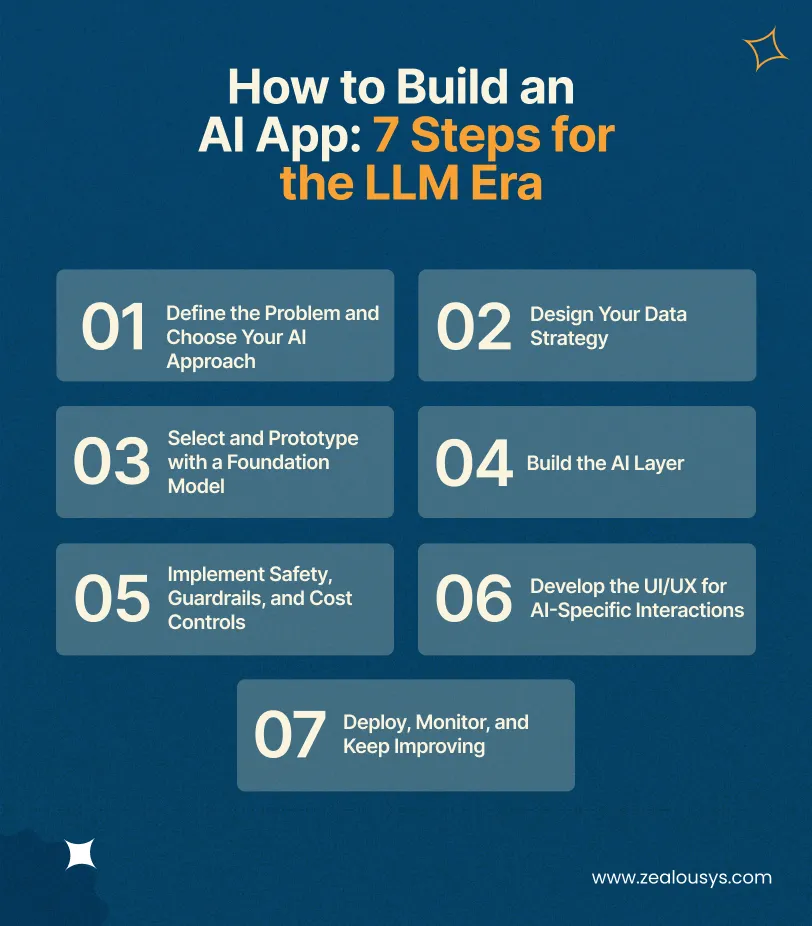
Before picking a model or framework, get precise about what the AI is actually doing. “We want AI in our product” is not a problem statement. “We want users to query 500 internal policy documents and get accurate answers in under 3 seconds.”
From there, map the problem to an approach. Does it require language understanding and generation? Start with an LLM API. Does it require knowledge of your proprietary data? Layer in RAG. Does it require a decision made thousands of times a day on structured inputs? Consider a custom ML model. Does it require autonomous multi-step action? Plan for an agent architecture.
This mapping determines your entire cost and timeline. Getting it wrong at step one is the most expensive mistake in AI development.
Your data strategy differs significantly depending on your approach. For LLM apps, you need a well-maintained knowledge base (for RAG) or a high-quality prompt library. For fine-tuned models, you need labelled training data. For custom ML, you need a full data pipeline with versioning and drift detection.
The consistent theme across all three: data quality compounds. In our experience, data preparation is the single most underestimated phase in any AI project. Budget 30-50% of your project timeline on it: cleaning, structuring, and validating your inputs before any model work begins.
Unless your use case clearly requires a custom model (and most don’t), start with an LLM API. Pick a model in the budget or mid-tier (Gemini Flash, Claude Haiku, or GPT-5 mini) and build a working prototype. This gives you something concrete to evaluate quality against, and often the prototype reveals requirements you didn’t anticipate in the planning phase.
Resist the instinct to start with the most powerful model. Frontier models are expensive, and their extra capability rarely makes a difference in the prototype stage. Focus on cost reduction last. Once you know what quality you need, you can work backwards to the cheapest model that achieves it.
This is where the actual engineering begins. For an LLM-first app, the AI layer includes: system prompt design and iteration, context management (how much conversation history to pass), output parsing and structured response handling, and (for RAG) the full retrieval pipeline: embedding generation, vector database setup, chunking strategy, and retrieval tuning.
For AI agents, this step is more complex: tool definition, planning loop implementation, memory management (what the agent remembers across sessions vs. within a session), and failure handling (what happens when a tool call fails or the model takes an unexpected action path).
Build your evaluation harness in this step, not after. Define a set of test cases that represent your expected query distribution, edge cases included, and run them automatically on every code change. This is how you catch regressions when you swap models or update your prompts.
Every client-facing AI app needs:
These are engineering requirements, not afterthoughts. Budget 10-15% of your development timeline for them.
AI apps have UI patterns that don’t exist in traditional applications: streaming responses (typing indicator feel), source citations, confidence signals, conversation history management, and graceful degradation when the model is uncertain. These patterns matter for trust and adoption.
Design for the failure case explicitly. What does the UI show when the model doesn’t know the answer? When it’s slow? When it gives a wrong answer and the user needs to report it? These flows are where most AI app UX falls apart.
Read Also: Chatbots vs LLMs vs AI Agents: Key Differences, Use Cases, and ROI
AI apps require active post-launch management in a way traditional apps don’t. Models get updated by providers. Usage patterns drift away from your test distribution. Token costs change. Knowledge bases go stale.
Your monitoring stack should track: response quality (ideally through a combination of automated evals and sampled human review), per-query costs, latency, and error rates. Set up alerts for cost spikes. A change in prompt design or user behavior can double your monthly API bill without warning. Plan for quarterly prompt and knowledge base reviews as part of your maintenance budget.
These are the categories with strong product-market fit, proven technical feasibility, and documented ROI. Based on what we’re actually seeing clients invest in right now.
Enterprise knowledge bases and copilots.
RAG over company documentation, CRM data, and internal knowledge bases. Employees get instant, accurate answers instead of hunting through Confluence or emailing colleagues. The technical challenge here is almost always data quality, not model selection. Your retrieval is only as good as your knowledge base organization.
LLM-powered agents that handle tier-1 deflection, escalate with context when needed, and get better over time through feedback loops. The real differentiator from 2024 chatbots is the ability to handle novel questions outside scripted flows. Guardrails and QA carry significant weight, so budget accordingly.
Extracting structured data from unstructured documents (invoices, contracts, medical records, forms) using LLMs with structured output. It’s dramatically faster and more accurate than regex or OCR-based pipelines. This is a category where Zealous has seen very quick ROI for logistics and legal clients.
Agents that execute multi-step business workflows: booking, research, data enrichment, report generation, and outreach. The investment is higher and the QA bar is strict. The payoff is automation of complete workflows rather than individual tasks. That’s a fundamentally different category of value.
Apps that understand both images and text: visual search, image-based Q&A, product tagging, and medical image analysis with narrative reports. Frontier models are now multimodal by default, so building this no longer requires a separate computer vision pipeline.
The 2026 cost picture has two major components that the 2024 version of this guide ignored: build cost and ongoing operational cost. For AI apps, the second number is as important as the first.
This is the line item most project budgets miss. LLM API costs, vector database hosting, monitoring tooling, and regular retraining or knowledge base maintenance typically run 20-40% of build cost per year. For a $100,000 build, plan $20,000-$40,000 in annual operating costs on top.
Specifically:
Start with RAG before committing to fine-tuning. RAG year-one cost is approximately 60% of fine-tuning for equivalent quality in most enterprise use cases. Fine-tune only when RAG has hit a documented quality ceiling and the scale of usage justifies the investment in training infrastructure.
Read Also: How to Pick the Right LLM for Market Research and Sentiment Analysis?
You can use this table as a starting point. Actual costs vary based on your data complexity, team location, integration depth, and quality requirements.
| App Type | Build Cost | Timeline | Monthly Operating Cost | Best For |
|---|---|---|---|---|
| LLM-wrapper app | $25,000 – $80,000 | 6-12 weeks | $300 – $2,000 | Chatbots, AI search, simple copilots |
| RAG-based app | $60,000 – $200,000 | 3-5 months | $500 – $5,000 | Knowledge bases, support agents, document Q&A |
| AI agent system | $80,000 – $300,000+ | 5-9 months | $1,000 – $7,500 | Workflow automation, multi-step tasks |
| Custom ML / fine-tuned model | $150,000 – $750,000 | 6-14 months | $2,000 – $15,000 | Fraud detection, medical imaging, high-precision tasks |
After building AI products across multiple industries, these are the failure patterns we see most often.
Teams spend three months building a full RAG pipeline before testing whether the simpler LLM-only approach would have worked. Build the simplest version first, test it with real users, then invest in complexity.
Apps that ship without automated evals degrade silently. When the model provider updates their model (and they do, without warning), your application’s behaviour changes. You only find out through user complaints.
“Our data is in Confluence, we’ll just connect it” is a statement we hear often. Document quality, inconsistency, duplication, and stale information all degrade RAG quality directly. Data cleaning is not a one-time task.
Flagship LLMs are impressive. They are also 100x more expensive per token than budget models. For many tasks (classification, summarization, simple Q&A) a smaller model performs at 90% of the quality for 5% of the cost. Profile your tasks before committing to a model tier.
“It’s just internal, our employees won’t misuse it.” Internal AI tools still need basic content controls and PII handling. Employees share screenshots. Data leaks happen through indirect exposure, not just direct misuse.
AI apps have monthly infrastructure costs that traditional apps don’t. A team that builds a $150,000 app and doesn’t budget for $40,000/year in operating costs will face uncomfortable conversations six months after launch.
Read Also: How to Deploy Large Language Models
For most use cases in 2026, start with an LLM API. Train your own model only when your data can’t leave your infrastructure for compliance reasons, when you need the latency that API calls can’t provide, or when you’ve exhausted what fine-tuning and RAG can achieve and scale justifies the infrastructure investment. Custom training is a significant undertaking. Budget 6-14 months and $200,000-$800,000+ for serious custom model work.
RAG (Retrieval-Augmented Generation) is the technique of connecting an LLM to your own data so it answers questions based on your knowledge base rather than general training. You need RAG when your app must answer questions about your specific products, policies, documents, or customer data, and when that information is too large to fit in a prompt or changes frequently. If you’re building a customer support bot, internal documentation assistant, or any knowledge-intensive application, RAG is almost certainly the right architecture.
A basic LLM-wrapper app (chatbot, search feature, simple copilot) takes 6-12 weeks with an experienced team. A RAG-based application with proper evaluation infrastructure takes 3-5 months. AI agents with multiple integrations and reliability requirements take 5-9 months. Add 1-3 months if your data is in poor condition, which it usually is. These timelines assume a team that has shipped AI products before; first-time AI builds typically run 30-50% longer.
A chatbot responds to questions. An AI agent takes actions. An agent has access to tools: the ability to search the web, call APIs, read and write files, execute code, or interact with external systems. It also has a planning loop that lets it decompose a goal into steps and execute them autonomously. Building a reliable agent is significantly more complex than a chatbot because the failure modes involve actions, not just words.
The most effective strategies are: use the cheapest model that meets your quality bar (not the most capable one), implement prompt caching for repeated context (50-90% discount from most providers), use batch APIs for non-real-time workloads (50% discount), cap your context window aggressively, and route straightforward tasks to budget models while reserving premium models for complex reasoning. Token costs vary by nearly 150x across model tiers. Model selection is your single biggest cost control.
Both OpenAI and Anthropic offer enterprise API agreements with data privacy terms that prohibit training on your data. That said, any data you send in a prompt is technically transiting their infrastructure. For highly sensitive data (patient records, financial data under strict compliance regimes), either use a self-hosted open-weight model (Llama, Mistral, DeepSeek) or ensure you have a signed data processing agreement that meets your regulatory requirements. We configure all of our enterprise client deployments with PII redaction before data reaches any external API.
Plan for 20-30% of your build cost per year in ongoing operational costs. This covers LLM API usage, vector database hosting, monitoring tools, quarterly prompt/knowledge base maintenance, and model migration when providers update their APIs. Most teams underestimate this line item and face an awkward conversation with stakeholders 6-12 months post-launch.
Don’t overthink model selection at the start. Pick one provider that has the model quality you need at a price that makes sense, and abstract your LLM calls so you can swap later. In practice, if you need the best reasoning on complex tasks, OpenAI or Anthropic. If you need the best cost-per-quality ratio and a large context window, Gemini. If your data can’t leave your own infrastructure, Llama or Mistral is self-hosted. Most production systems end up using two or three providers, with different models handling different tasks within the same application.
The hardest part of building an AI app in 2026 has nothing to do with technology. The model options are excellent. The frameworks are mature. The costs are manageable. The hard part is scope discipline: knowing what to build, what to defer, and what not to build at all.
Most of the expensive AI project failures we see at Zealous aren’t caused by wrong model selection or budget overruns. They’re caused by starting with a solution and working backwards to a problem. A team decides they want an AI agent, then spends six months and $200K building one, only to find that a simple RAG chatbot would have solved 90% of their users’ needs for $40K in eight weeks.
The teams shipping AI products that actually get used share one trait: they started small, validated fast, and expanded based on evidence. Not ambition.
If you’re planning an AI app and want a second opinion on your approach, a sanity check on your architecture, or a realistic estimate before you commit budget, our team at Zealous has delivered over 50 AI products across healthcare, logistics, education, fintech, and enterprise. We’d be glad to take a look.
Need a custom estimate or an architecture review for your AI app project? Talk to our AI team
Our team is always eager to know what you are looking for. Drop them a Hi!

Pranjal Mehta is the Managing Director of Zealous System, a leading software solutions provider. Having 10+ years of experience and clientele across the globe, he is always curious to stay ahead in the market by inculcating latest technologies and trends in Zealous.


Comments